4.9. HTTP关键字
还有其他内容修饰符可以在应用程序层提供特定于协议的功能。可以在以下位置找到更多信息 Payload关键字 .这些关键字确保规则仅检查网络流量的特定部分。例如,特别检查请求URI,cookie或HTTP请求或响应正文等。
所有HTTP关键字都是修饰符,注意内容修饰符和粘滞缓冲区(sticky buffer)之间的区别。 有关更多信息,请参阅 修饰符关键字 . 对于新手:
‘content modifiers’ 回顾规则,例如:
alert http any any -> any any (content:"index.php"; http_uri; sid:1;)
‘sticky buffers’ 前置并且它后面所有的关键字都作用在该缓冲区, 例如:
alert http any any -> any any (http_response_line; content:"403 Forbidden"; sid:1;)
request 关键字如下:
| 关键字 | Sticky或修饰符 | 方向 |
|---|---|---|
| http_uri | Modifier | Request |
| http_raw_uri | Modifier | Request |
| http_method | Modifier | Request |
| http_request_line | Sticky Buffer | Request |
| http_client_body | Modifier | Request |
| http_header | Modifier | Both |
| http_raw_header | Modifier | Both |
| http_cookie | Modifier | Both |
| http_user_agent | Modifier | Request |
| http_host | Modifier | Request |
| http_raw_host | Modifier | Request |
| http_accept | Sticky Buffer | Request |
| http_accept_lang | Sticky Buffer | Request |
| http_accept_enc | Sticky Buffer | Request |
| http_referer | Sticky Buffer | Request |
| http_connection | Sticky Buffer | Request |
| http_content_type | Sticky Buffer | Both |
| http_content_len | Sticky Buffer | Both |
| http_start | Sticky Buffer | Both |
| http_protocol | Sticky Buffer | Both |
| http_header_names | Sticky Buffer | Both |
response 关键字如下:
| 关键字 | Sticky或修饰符 | 方向 |
|---|---|---|
| http_stat_msg | Modifier | Response |
| http_stat_code | Modifier | Response |
| http_response_line | Sticky Buffer | Response |
| http_header | Modifier | Both |
| http_raw_header | Modifier | Both |
| http_cookie | Modifier | Both |
| http_server_body | Modifier | Response |
| file_data | Sticky Buffer | Response |
| http_content_type | Sticky Buffer | Both |
| http_content_len | Sticky Buffer | Both |
| http_start | Sticky Buffer | Both |
| http_protocol | Sticky Buffer | Both |
| http_header_names | Sticky Buffer | Both |
4.9.1. HTTP 入门
了解HTTP请求和响应的结构非常重要。.一个简单的HTTP请求和响应的例子如下:
HTTP request
GET /index.html HTTP/1.0\r\n
GET 是请求 method. 请求的例子有: GET, POST, PUT, HEAD等等. URI路径为 /index.html, HTTP版本是 HTTP/1.0. 过去的这些前,使用过多个HTTP版本; 包括0.9, 1.0 和 1.1, 现在用得最广泛的是1.0 和 1.1.
HTTP response
HTTP/1.0 200 OK\r\n
<html>
<title> some page </title>
</HTML>
在这个例子里, HTTP/1.0 是HTTP版本, 200 是响应状态码, OK是响应状态信息.
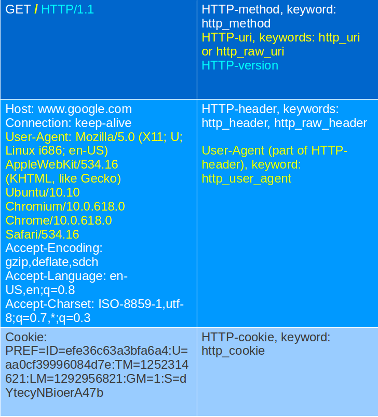
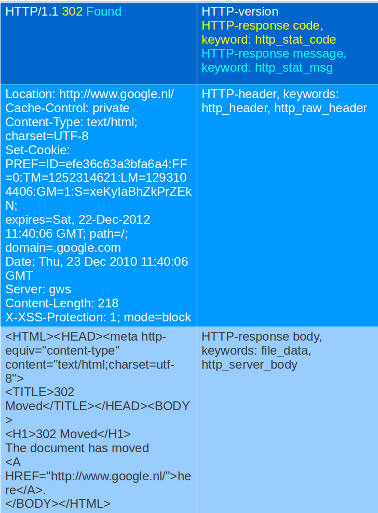
另一个更加详细的例子:
请求:
响应:
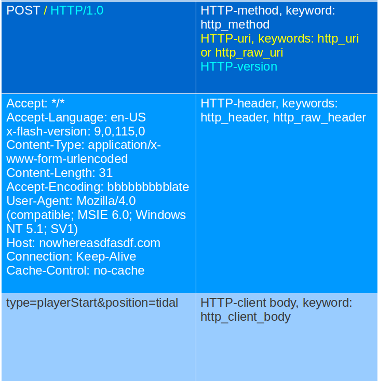
请求:
尽管cookie在HTTP头部里发送,但是你不能使用 http_header 关键字来匹配它,cookie使用它自己的关键字来进行匹配,叫 http_cookie.
表的每个部分属于一个所谓的 buffer. HTTP方法属于方法缓冲区,HTTP头部属于头部缓冲区等。缓冲区是Suricata在内存中提取以进行检查的请求或响应的特定部分。
所有先前描述的关键字可以规则中的缓冲区组合使用。关键字 distance 和 within 是相对修饰符,因此它们只能在同一个缓冲区中使用。您不能使用相对修饰符将content匹配与不同缓冲区相关联。
4.9.2. http_method
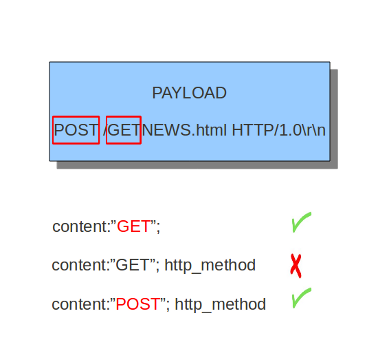
通过 http_method 修饰符, 可以仅在HTTP方法缓冲区上进行匹配,这个关键字可以和所有之前提到过的content修饰符组合使用,如: depth, distance, offset, nocase and within.
HTTP方法的例子有: GET, POST, PUT, HEAD, DELETE, TRACE, OPTIONS, CONNECT and PATCH.
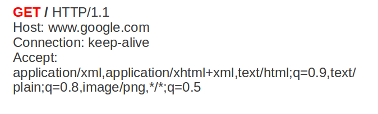
HTTP请求中的方法:
方法的目的:
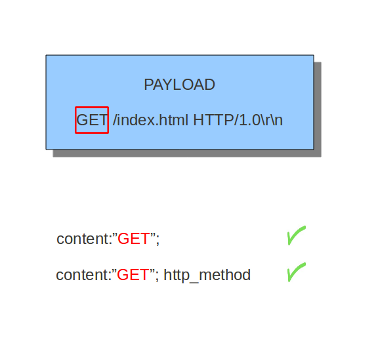
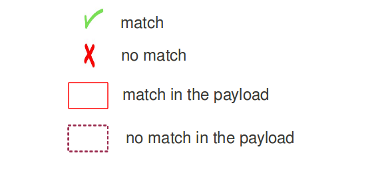
4.9.3. http_uri and http_raw_uri
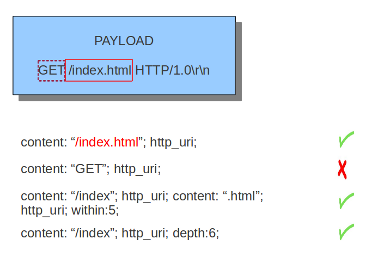
通过 http_uri 和 http_raw_uri content修饰符, 可以仅在请求URI缓冲区上匹配。这个关键字可以和所有之前提到过的content修饰符组合使用,如: depth, distance, offset, nocase and within.
uri在Suricata中有两种形式:raw_uri和规范化的uri。例如,空格可以用十六进制符号%20表示,将这个十六进制转换成空格,就表示将其规范化。虽然可以匹配uri中字符%20的特定内容,但这意味着匹配raw_uri。raw_uri和规范化的uri是不同的缓冲区。因此,raw_uri检查raw_uri缓冲区并且无法检查规范化缓冲区。
HTTP请求中URI的例子:
4.9.4. uricontent
uricontent关键字和http_uricontent关键字具有完全一样的作用.uricontent是一个过时的(但是仍然支持的) 方法,表示仅在请求URI缓冲区上匹配.
uricontent示例:
alert tcp $HOME_NET any -> $EXTERNAL_NET $HTTP_PORTS (msg:”ET TROJAN Possible Vundo Trojan Variant reporting to Controller”; flow:established,to_server; content:”POST “; depth:5; uricontent:”/frame.html?”; urilen: > 80; classtype:trojan-activity; reference:url,doc.emergingthreats.net/2009173; reference:url,www.emergingthreats.net/cgi-bin/cvsweb.cgi/sigs/VIRUS/TROJAN_Vundo; sid:2009173; rev:2;)
http_uri and uricontent 的区别在于语法:
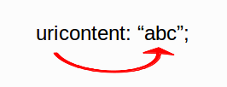
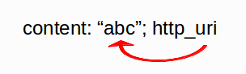
在编写新规则时, 建议使用 http_uri content修饰符,而不是已经过时的 uricontent 关键字.
4.9.5. urilen
urilen关键字用来匹配请求URI的长度,可以使用<和>操作符, 分别表示 小于 和 大于.
urilen格式是:urilen:3;
其它可能的格式:
urilen:1;
urilen:>1;
urilen:<10;
urilen:10<>20;        (大于 10, 小于 20)
如:
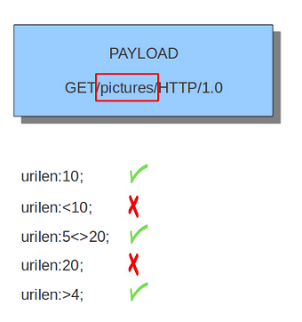
规则中使用 urilen 的例子:
你可以添加 norm 或 raw 来定义你想使用什么类型的缓冲区(规范化的或者raw缓冲区).
4.9.6. http_protocol
http_protocol检查HTTP请求或者响应中的协议字段。 如果请求行是 ‘GET / HTTP/1.0rn’, 那么这个缓冲区就是 ‘HTTP/1.0’.
如:
alert http any any -> any any (flow:to_server; http_protocol; content:"HTTP/1.0"; sid:1;)
4.9.7. http_request_line
http_request_line强制检查整个HTTP请求行.
如:
alert http any any -> any any (http_request_line; content:"GET / HTTP/1.0"; sid:1;)
4.9.8. http_header 和 http_raw_header
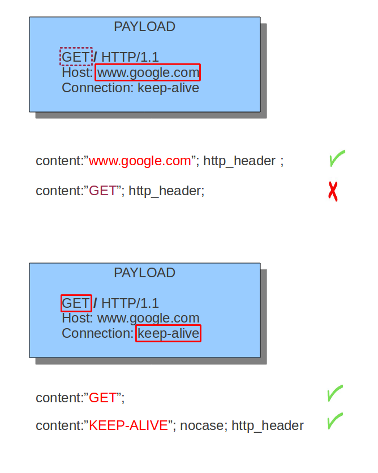
通过 http_header content修饰符, 可以仅在HTTP头部缓冲区匹配,这包含提取到单个缓冲区中的所有头部,除开文档中指示的那些无法通过此缓冲区匹配并具有自己的content修饰符的头部(如 http_cookie). 这个关键字可以和所有之前提到过的content修饰符组合使用,如: depth, distance, offset, nocase and within.
Note: 头部缓冲区是 规范化的. 末尾的所有空格和制表符都已经删除。 详见: https://lists.openinfosecfoundation.org/pipermail/oisf-users/2011-October/000935.html. 要避免这一点,请使用http_raw_header关键字.
HTTP请求中头部的例子:
4.9.9. http_cookie
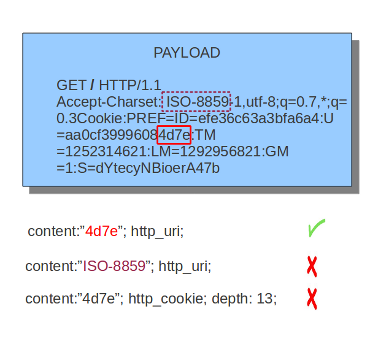
通过 http_cookie content修饰符, 可以仅在cookie缓冲区上匹配,这个关键字可以和所有之前提到过的content修饰符组合使用,如: depth, distance, offset, nocase and within.
注意cookie在HTTP头部里传输,但是会提取到一个单独的缓冲区,通过他自己特有的content修饰符来匹配。
HTTP请求中cookie的例子:
4.9.10. http_user_agent
http_user_agentcontent修饰符是HTTP请求头部的一部分,可以仅在User-Agent请求头上匹配。它是规范化的,这意味着它不包括 _”User-Agent: “_ 头部名称和分隔符,也不包括末尾的回车换行符(CRLF)。 T这个关键字可以和所有之前提到过的content修饰符组合使用,如:depth,distance,offset,nocaseandwithin. 注意pcre关键字在使用/V修饰符时,也可以检查这个缓冲区。
规范化: 开头的空白字符 不是 这个缓冲区的一部分,因此. “User-Agent: rn” 会导致一个空的 http_user_agent 缓冲区。
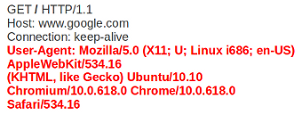
HTTP请求中User-Agent的例子:
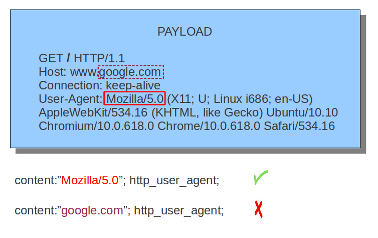
http_user_agent 示例:
4.9.10.1. 注意
The
http_user_agentbuffer will NOT include the header name, colon, or leading whitespace. i.e. it will not include “User-Agent: “.The
http_user_agentbuffer does not include a CRLF (0x0D 0x0A) at the end. If you want to match the end of the buffer, use a relativeisdataator a PCRE (although PCRE will be worse on performance).If a request contains multiple “User-Agent” headers, the values will be concatenated in the
http_user_agentbuffer, in the order seen from top to bottom, with a comma and space (“, “) between each of them.Example request:
GET /test.html HTTP/1.1
User-Agent: SuriTester/0.8
User-Agent: GGGG
http_user_agentbuffer contents:SuriTester/0.8, GGGG
Corresponding PCRE modifier:
VUsing the
http_user_agentbuffer is more efficient when it comes to performance than using thehttp_headerbuffer (~10% better).https://blog.inliniac.net/2012/07/09/suricata-http_user_agent-vs-http_header/
4.9.11. http_accept
Sticky buffer to match on the HTTP Accept header. Only contains the header value. The \r\n after the header are not part of the buffer.
Example:
alert http any any -> any any (http_accept; content:"image/gif"; sid:1;)
4.9.12. http_accept_enc
Sticky buffer to match on the HTTP Accept-Encoding header. Only contains the header value. The \r\n after the header are not part of the buffer.
Example:
alert http any any -> any any (http_accept_enc; content:"gzip"; sid:1;)
4.9.13. http_accept_lang
Sticky buffer to match on the HTTP Accept-Language header. Only contains the header value. The \r\n after the header are not part of the buffer.
Example:
alert http any any -> any any (http_accept_lang; content:"en-us"; sid:1;)
4.9.14. http_connection
Sticky buffer to match on the HTTP Connection header. Only contains the header value. The \r\n after the header are not part of the buffer.
Example:
alert http any any -> any any (http_connection; content:"keep-alive"; sid:1;)
4.9.15. http_content_type
Sticky buffer to match on the HTTP Content-Type headers. Only contains the header value. The \r\n after the header are not part of the buffer.
Use flow:to_server or flow:to_client to force inspection of request or response.
Examples:
alert http any any -> any any (flow:to_server; \
        http_content_type; content:"x-www-form-urlencoded"; sid:1;)

alert http any any -> any any (flow:to_client; \
        http_content_type; content:"text/javascript"; sid:2;)
4.9.16. http_content_len
Sticky buffer to match on the HTTP Content-Length headers. Only contains the header value. The \r\n after the header are not part of the buffer.
Use flow:to_server or flow:to_client to force inspection of request or response.
Examples:
alert http any any -> any any (flow:to_server; \
        http_content_len; content:"666"; sid:1;)

alert http any any -> any any (flow:to_client; \
        http_content_len; content:"555"; sid:2;)
To do a numeric inspection of the content length, byte_test can be used.
Example, match if C-L is equal to or bigger than 8079:
alert http any any -> any any (flow:to_client; \
        http_content_len; byte_test:0,>=,8079,0,string,dec; sid:3;)
4.9.17. http_referer
Sticky buffer to match on the HTTP Referer header. Only contains the header value. The \r\n after the header are not part of the buffer.
Example:
alert http any any -> any any (http_referer; content:".php"; sid:1;)
4.9.18. http_start
Inspect the start of a HTTP request or response. This will contain the request/reponse line plus the request/response headers. Use flow:to_server or flow:to_client to force inspection of request or response.
Example:
alert http any any -> any any (http_start; content:"HTTP/1.1|0d 0a|User-Agent"; sid:1;)
The buffer contains the normalized headers and is terminated by an extra \r\n to indicate the end of the headers.
4.9.19. http_header_names
Inspect a buffer only containing the names of the HTTP headers. Useful for making sure a header is not present or testing for a certain order of headers.
Buffer starts with a \r\n and ends with an extra \r\n.
Example buffer:
\\r\\nHost\\r\\n\\r\\n
Example rule:
alert http any any -> any any (http_header_names; content:"|0d 0a|Host|0d 0a|"; sid:1;)
Example to make sure only Host is present:
alert http any any -> any any (http_header_names; \
        content:"|0d 0a|Host|0d 0a 0d 0a|"; sid:1;)
Example to make sure User-Agent is directly after Host:
alert http any any -> any any (http_header_names; \
        content:"|0d 0a|Host|0d 0a|User-Agent|0d 0a|"; sid:1;)
Example to make sure User-Agent is after Host, but not necessarily directly after:
alert http any any -> any any (http_header_names; \
        content:"|0d 0a|Host|0d 0a|"; content:"|0a 0d|User-Agent|0d 0a|"; \
        distance:-2; sid:1;)
4.9.20. http_client_body
With the http_client_body content modifier, it is possible to
match specifically and only on the HTTP request body. The keyword can
be used in combination with all previously mentioned content modifiers
like distance, offset, nocase, within, etc.
Example of http_client_body in a HTTP request:
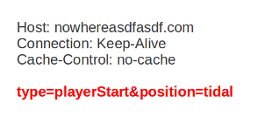
Example of the purpose of http_client_body:
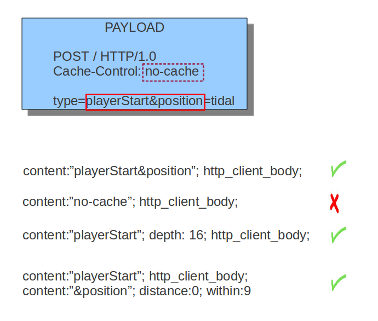
Note: how much of the request/client body is inspected is controlled
in the libhtp configuration section via the request-body-limit
setting.
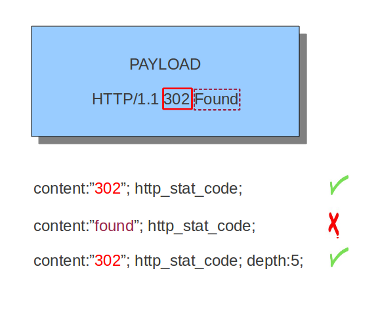
4.9.21. http_stat_code
With the http_stat_code content modifier, it is possible to match
specifically and only on the HTTP status code buffer. The keyword can
be used in combination with all previously mentioned content modifiers
like distance, offset, nocase, within, etc.
Example of http_stat_code in a HTTP response:
Example of the purpose of http_stat_code:
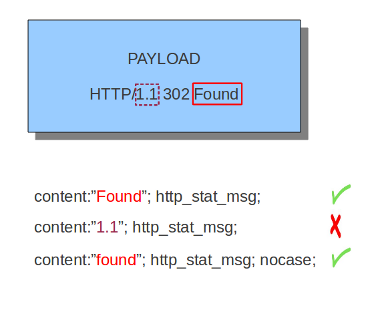
4.9.22. http_stat_msg
With the http_stat_msg content modifier, it is possible to match
specifically and only on the HTTP status message buffer. The keyword
can be used in combination with all previously mentioned content
modifiers like depth, distance, offset, nocase and
within.
Example of http_stat_msg in a HTTP response:
Example of the purpose of http_stat_msg:
4.9.23. http_response_line
The http_response_line forces the whole HTTP response line to be inspected.
Example:
alert http any any -> any any (http_response_line; content:"HTTP/1.0 200 OK"; sid:1;)
4.9.24. http_server_body
With the http_server_body content modifier, it is possible to
match specifically and only on the HTTP response body. The keyword can
be used in combination with all previously mentioned content modifiers
like distance, offset, nocase, within, etc.
Note: how much of the response/server body is inspected is controlled
in your libhtp configuration section via the response-body-limit
setting.
4.9.24.1. Notes
- Using
http_server_bodyis similar to having content matches that come afterfile_dataexcept that it doesn’t permanently (unless reset) set the detection pointer to the beginning of the server response body. i.e. it is not a sticky buffer. http_server_bodywill match on gzip decoded data just likefile_datadoes.- Since
http_server_bodymatches on a server response, it can’t be used with theto_serverorfrom_clientflow directives. - Corresponding PCRE modifier:
Q - further notes at the
file_datasection below.
4.9.25. http_host and http_raw_host
With the http_host content modifier, it is possible to
match specifically and only the normalized hostname.
The http_raw_host inspects the raw hostname.
The keyword can be used in combination with most of the content modifiers
like distance, offset, within, etc.
The nocase keyword is not allowed anymore. Keep in mind that you need
to specify a lowercase pattern.
4.9.25.1. Notes
The
http_hostandhttp_raw_hostbuffers are populated from either the URI (if the full URI is present in the request like in a proxy request) or the HTTP Host header. If both are present, the URI is used.The
http_hostandhttp_raw_hostbuffers will NOT include the header name, colon, or leading whitespace if populated from the Host header. i.e. they will not include “Host: “.The
http_hostandhttp_raw_hostbuffers do not include a CRLF (0x0D 0x0A) at the end. If you want to match the end of the buffer, use a relative ‘isdataat’ or a PCRE (although PCRE will be worse on performance).The
http_hostbuffer is normalized to be all lower case.The content match that
http_hostapplies to must be all lower case or have thenocaseflag set.http_raw_hostmatches the unnormalized buffer so matching will be case-sensitive (unlessnocaseis set).If a request contains multiple “Host” headers, the values will be concatenated in the
http_hostandhttp_raw_hostbuffers, in the order seen from top to bottom, with a comma and space (“, “) between each of them.Example request:
GET /test.html HTTP/1.1
Host: ABC.com
Accept: */*
Host: efg.net
http_hostbuffer contents:abc.com, efg.net
http_raw_hostbuffer contents:ABC.com, efg.net
Corresponding PCRE modifier (
http_host):WCorresponding PCRE modifier (
http_raw_host):Z
4.9.26. file_data
With file_data, the HTTP response body is inspected, just like
with http_server_body. The file_data keyword works a bit
differently from the normal content modifiers; when used in a rule,
all content matches following it in the rule are affected (modified)
by it.
Example:
alert http any any -> any any (file_data; content:"abc"; content:"xyz";)
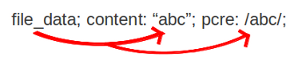
The file_data keyword affects all following content matches, until
the pkt_data keyword is encountered or it reaches the end of the
rule. This makes it a useful shortcut for applying many content
matches to the HTTP response body, eliminating the need to modify each
content match individually.
As the body of a HTTP response can be very large, it is inspected in smaller chunks.
How much of the response/server body is inspected is controlled
in your libhtp configuration section via the response-body-limit
setting.
If the HTTP body is a flash file compressed with ‘deflate’ or ‘lzma’,
it can be decompressed and file_data can match on the decompress data.
Flash decompression must be enabled under libhtp configuration:
# Decompress SWF files.
# 2 types: 'deflate', 'lzma', 'both' will decompress deflate and lzma
# compress-depth:
# Specifies the maximum amount of data to decompress,
# set 0 for unlimited.
# decompress-depth:
# Specifies the maximum amount of decompressed data to obtain,
# set 0 for unlimited.
swf-decompression:
  enabled: yes
  type: both
  compress-depth: 0
  decompress-depth: 0
4.9.26.1. Notes
- If a HTTP body is using gzip or deflate,
file_datawill match on the decompressed data. - Negated matching is affected by the chunked inspection. E.g.
‘content:!”<html”;’ could not match on the first chunk, but would
then possibly match on the 2nd. To avoid this, use a depth setting.
The depth setting takes the body size into account.
Assuming that the
response-body-minimal-inspect-sizeis bigger than 1k, ‘content:!”<html”; depth:1024;’ can only match if the pattern ‘<html’ is absent from the first inspected chunk. file_datacan also be used with SMTP