4.9. HTTP Keywords
There are additional content modifiers that can provide protocol-specific capabilities at the application layer. More information can be found at Payload Keywords These keywords make sure the signature checks only specific parts of the network traffic. For instance, to check specifically on the request URI, cookies, or the HTTP request or response body, etc.
All HTTP keywords are modifiers. Note the difference between content modifiers and sticky buffers. See Modifier Keywords for more information. As a refresher:
‘content modifiers’ look back in the rule, e.g.:
alert http any any -> any any (content:"index.php"; http_uri; sid:1;)
‘sticky buffers’ are placed first and all keywords following it apply to that buffer, for instance:
alert http any any -> any any (http_response_line; content:"403 Forbidden"; sid:1;)
The following request keywords are available:
| Keyword | Sticky or Modifier | Direction |
|---|---|---|
| http_uri | Modifier | Request |
| http_raw_uri | Modifier | Request |
| http_method | Modifier | Request |
| http_request_line | Sticky Buffer | Request |
| http_client_body | Modifier | Request |
| http_header | Modifier | Both |
| http_raw_header | Modifier | Both |
| http_cookie | Modifier | Both |
| http_user_agent | Modifier | Request |
| http_host | Modifier | Request |
| http_raw_host | Modifier | Request |
| http_accept | Sticky Buffer | Request |
| http_accept_lang | Sticky Buffer | Request |
| http_accept_enc | Sticky Buffer | Request |
| http_referer | Sticky Buffer | Request |
| http_connection | Sticky Buffer | Request |
| http_content_type | Sticky Buffer | Both |
| http_content_len | Sticky Buffer | Both |
| http_start | Sticky Buffer | Both |
| http_protocol | Sticky Buffer | Both |
| http_header_names | Sticky Buffer | Both |
The following response keywords are available:
| Keyword | Sticky or Modifier | Direction |
|---|---|---|
| http_stat_msg | Modifier | Response |
| http_stat_code | Modifier | Response |
| http_response_line | Sticky Buffer | Response |
| http_header | Modifier | Both |
| http_raw_header | Modifier | Both |
| http_cookie | Modifier | Both |
| http_server_body | Modifier | Response |
| file_data | Sticky Buffer | Response |
| http_content_type | Sticky Buffer | Both |
| http_content_len | Sticky Buffer | Both |
| http_start | Sticky Buffer | Both |
| http_protocol | Sticky Buffer | Both |
| http_header_names | Sticky Buffer | Both |
4.9.1. HTTP Primer
It is important to understand the structure of HTTP requests and responses. A simple example of a HTTP request and response follows:
HTTP request
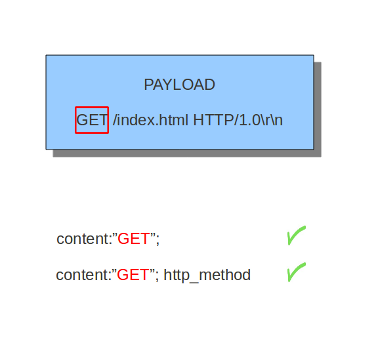
GET /index.html HTTP/1.0\r\n
GET is a request method. Examples of methods are: GET, POST, PUT,
HEAD, etc. The URI path is /index.html and the HTTP version is
HTTP/1.0. Several HTTP versions have been used over the years; of
the versions 0.9, 1.0 and 1.1, 1.0 and 1.1 are the most commonly used
today.
HTTP response
HTTP/1.0 200 OK\r\n
<html>
<title> some page </title>
</HTML>
In this example, HTTP/1.0 is the HTTP version, 200 the response status code and OK the response status message.
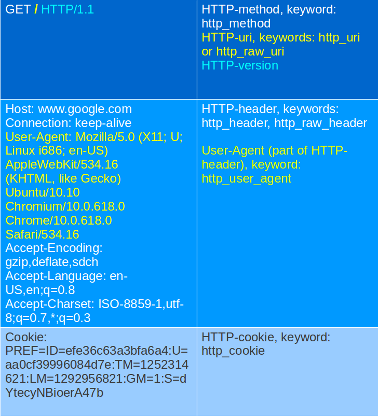
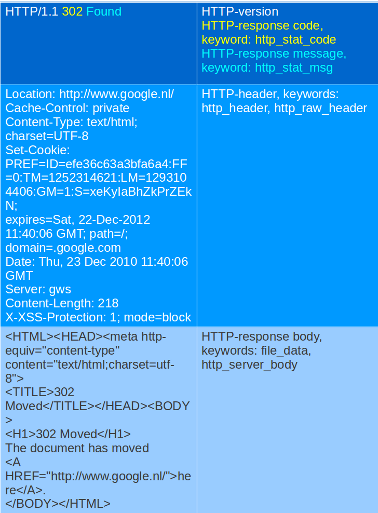
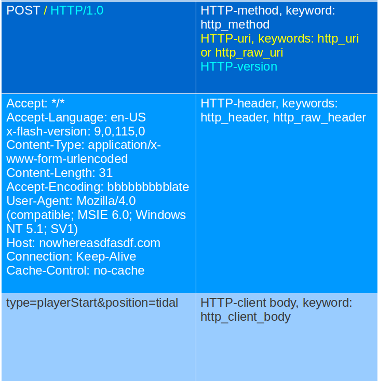
Another more detailed example:
Request:
Response:
Request:
Although cookies are sent in an HTTP header, you can not match on them
with the http_header keyword. Cookies are matched with their own
keyword, namely http_cookie.
Each part of the table belongs to a so-called buffer. The HTTP method belongs to the method buffer, HTTP headers to the header buffer etc. A buffer is a specific portion of the request or response that Suricata extracts in memory for inspection.
All previous described keywords can be used in combination with a
buffer in a signature. The keywords distance and within are
relative modifiers, so they may only be used within the same
buffer. You can not relate content matches against different buffers
with relative modifiers.
4.9.2. http_method
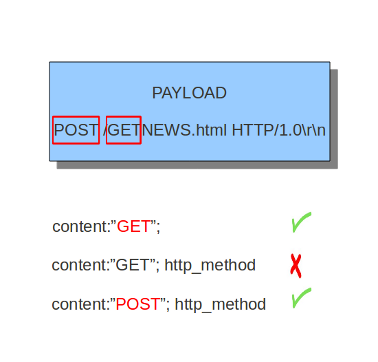
With the http_method content modifier, it is possible to match
specifically and only on the HTTP method buffer. The keyword can be
used in combination with all previously mentioned content modifiers
such as: depth, distance, offset, nocase and within.
Examples of methods are: GET, POST, PUT, HEAD, DELETE, TRACE, OPTIONS, CONNECT and PATCH.
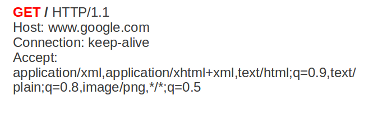
Example of a method in a HTTP request:
Example of the purpose of method:
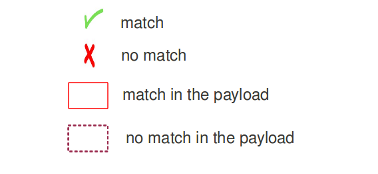
4.9.3. http_uri and http_raw_uri
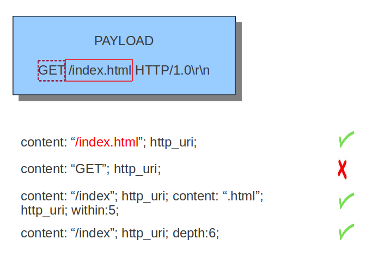
With the http_uri and the http_raw_uri content modifiers, it
is possible to match specifically and only on the request URI
buffer. The keyword can be used in combination with all previously
mentioned content modifiers like depth, distance, offset,
nocase and within.
The uri has two appearances in Suricata: the raw_uri and the normalized uri. The space for example can be indicated with the heximal notation %20. To convert this notation in a space, means normalizing it. It is possible though to match specific on the characters %20 in a uri. This means matching on the raw_uri. The raw_uri and the normalized uri are separate buffers. So, the raw_uri inspects the raw_uri buffer and can not inspect the normalized buffer.
Example of the URI in a HTTP request:

Example of the purpose of http_uri:
4.9.4. uricontent
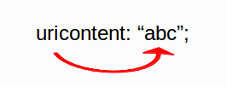
The uricontent keyword has the exact same effect as the
http_uri content modifier. uricontent is a deprecated
(although still supported) way to match specifically and only on the
request URI buffer.
Example of uricontent:
The difference between http_uri and uricontent is the syntax:
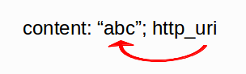
When authoring new rules, it is recommended that the http_uri
content modifier be used rather than the deprecated uricontent
keyword.
4.9.5. urilen
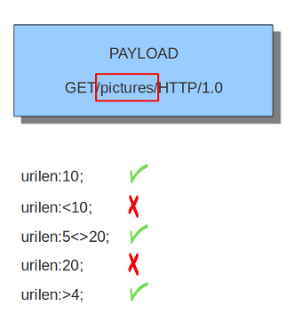
The urilen keyword is used to match on the length of the request
URI. It is possible to use the < and > operators, which
indicate respectively smaller than and larger than.
The format of urilen is:
urilen:3;
Other possibilities are:
urilen:1;
urilen:>1;
urilen:<10;
urilen:10<>20;        (bigger than 10, smaller than 20)
Example:
Example of urilen in a signature:
You can also append norm or raw to define what sort of buffer you want
to use (normalized or raw buffer).
4.9.6. http_protocol
The http_protocol inspects the protocol field from the HTTP request or
response line. If the request line is ‘GET / HTTP/1.0rn’, then this buffer
will contain ‘HTTP/1.0’.
Example:
alert http any any -> any any (flow:to_server; http_protocol; content:"HTTP/1.0"; sid:1;)
4.9.7. http_request_line
The http_request_line forces the whole HTTP request line to be inspected.
Example:
alert http any any -> any any (http_request_line; content:"GET / HTTP/1.0"; sid:1;)
4.9.8. http_header and http_raw_header
With the http_header content modifier, it is possible to match
specifically and only on the HTTP header buffer. This contains all of
the extracted headers in a single buffer, except for those indicated
in the documentation that are not able to match by this buffer and
have their own content modifier (e.g. http_cookie). The modifier
can be used in combination with all previously mentioned content
modifiers, like depth, distance, offset, nocase and
within.
Note: the header buffer is normalized. Any trailing whitespace and tab characters are removed. See: https://lists.openinfosecfoundation.org/pipermail/oisf-users/2011-October/000935.html. To avoid that, use thehttp_raw_headerkeyword.
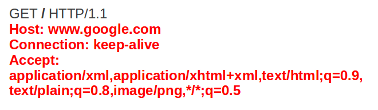
Example of a header in a HTTP request:
Example of the purpose of http_header:
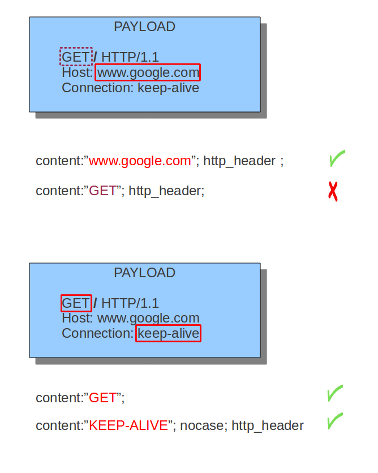
4.9.9. http_cookie
With the http_cookie content modifier, it is possible to match
specifically and only on the cookie buffer. The keyword can be used in
combination with all previously mentioned content modifiers like
depth, distance, offset, nocase and within.
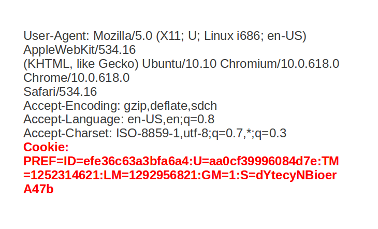
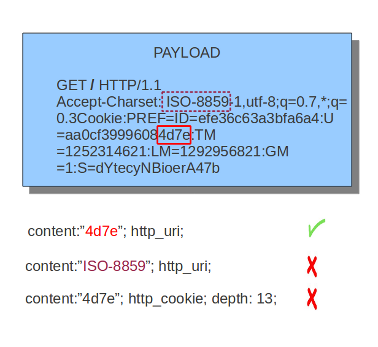
Note that cookies are passed in HTTP headers, but are extracted to a dedicated buffer and matched using their own specific content modifier.
Example of a cookie in a HTTP request:
Example of the purpose of http_cookie:
4.9.10. http_user_agent
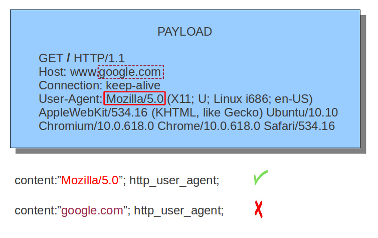
The http_user_agent content modifier is part of the HTTP request
header. It makes it possible to match specifically on the value of the
User-Agent header. It is normalized in the sense that it does not
include the _”User-Agent: “_ header name and separator, nor does it
contain the trailing carriage return and line feed (CRLF). The keyword
can be used in combination with all previously mentioned content
modifiers like depth, distance, offset, nocase and
within. Note that the pcre keyword can also inspect this
buffer when using the /V modifier.
Normalization: leading spaces are not part of this buffer. So
“User-Agent: rn” will result in an empty http_user_agent buffer.
Example of the User-Agent header in a HTTP request:
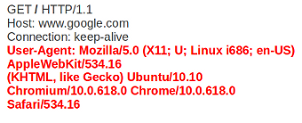
Example of the purpose of http_user_agent:
4.9.10.1. Notes
The
http_user_agentbuffer will NOT include the header name, colon, or leading whitespace. i.e. it will not include “User-Agent: “.The
http_user_agentbuffer does not include a CRLF (0x0D 0x0A) at the end. If you want to match the end of the buffer, use a relativeisdataator a PCRE (although PCRE will be worse on performance).If a request contains multiple “User-Agent” headers, the values will be concatenated in the
http_user_agentbuffer, in the order seen from top to bottom, with a comma and space (“, “) between each of them.Example request:
GET /test.html HTTP/1.1
User-Agent: SuriTester/0.8
User-Agent: GGGG
http_user_agentbuffer contents:SuriTester/0.8, GGGG
Corresponding PCRE modifier:
VUsing the
http_user_agentbuffer is more efficient when it comes to performance than using thehttp_headerbuffer (~10% better).https://blog.inliniac.net/2012/07/09/suricata-http_user_agent-vs-http_header/
4.9.11. http_accept
Sticky buffer to match on the HTTP Accept header. Only contains the header value. The \r\n after the header are not part of the buffer.
Example:
alert http any any -> any any (http_accept; content:"image/gif"; sid:1;)
4.9.12. http_accept_enc
Sticky buffer to match on the HTTP Accept-Encoding header. Only contains the header value. The \r\n after the header are not part of the buffer.
Example:
alert http any any -> any any (http_accept_enc; content:"gzip"; sid:1;)
4.9.13. http_accept_lang
Sticky buffer to match on the HTTP Accept-Language header. Only contains the header value. The \r\n after the header are not part of the buffer.
Example:
alert http any any -> any any (http_accept_lang; content:"en-us"; sid:1;)
4.9.14. http_connection
Sticky buffer to match on the HTTP Connection header. Only contains the header value. The \r\n after the header are not part of the buffer.
Example:
alert http any any -> any any (http_connection; content:"keep-alive"; sid:1;)
4.9.15. http_content_type
Sticky buffer to match on the HTTP Content-Type headers. Only contains the header value. The \r\n after the header are not part of the buffer.
Use flow:to_server or flow:to_client to force inspection of request or response.
Examples:
alert http any any -> any any (flow:to_server; \
        http_content_type; content:"x-www-form-urlencoded"; sid:1;)

alert http any any -> any any (flow:to_client; \
        http_content_type; content:"text/javascript"; sid:2;)
4.9.16. http_content_len
Sticky buffer to match on the HTTP Content-Length headers. Only contains the header value. The \r\n after the header are not part of the buffer.
Use flow:to_server or flow:to_client to force inspection of request or response.
Examples:
alert http any any -> any any (flow:to_server; \
        http_content_len; content:"666"; sid:1;)

alert http any any -> any any (flow:to_client; \
        http_content_len; content:"555"; sid:2;)
To do a numeric inspection of the content length, byte_test can be used.
Example, match if C-L is equal to or bigger than 8079:
alert http any any -> any any (flow:to_client; \
        http_content_len; byte_test:0,>=,8079,0,string,dec; sid:3;)
4.9.17. http_referer
Sticky buffer to match on the HTTP Referer header. Only contains the header value. The \r\n after the header are not part of the buffer.
Example:
alert http any any -> any any (http_referer; content:".php"; sid:1;)
4.9.18. http_start
Inspect the start of a HTTP request or response. This will contain the request/reponse line plus the request/response headers. Use flow:to_server or flow:to_client to force inspection of request or response.
Example:
alert http any any -> any any (http_start; content:"HTTP/1.1|0d 0a|User-Agent"; sid:1;)
The buffer contains the normalized headers and is terminated by an extra \r\n to indicate the end of the headers.
4.9.19. http_header_names
Inspect a buffer only containing the names of the HTTP headers. Useful for making sure a header is not present or testing for a certain order of headers.
Buffer starts with a \r\n and ends with an extra \r\n.
Example buffer:
\\r\\nHost\\r\\n\\r\\n
Example rule:
alert http any any -> any any (http_header_names; content:"|0d 0a|Host|0d 0a|"; sid:1;)
Example to make sure only Host is present:
alert http any any -> any any (http_header_names; \
        content:"|0d 0a|Host|0d 0a 0d 0a|"; sid:1;)
Example to make sure User-Agent is directly after Host:
alert http any any -> any any (http_header_names; \
        content:"|0d 0a|Host|0d 0a|User-Agent|0d 0a|"; sid:1;)
Example to make sure User-Agent is after Host, but not necessarily directly after:
alert http any any -> any any (http_header_names; \
        content:"|0d 0a|Host|0d 0a|"; content:"|0a 0d|User-Agent|0d 0a|"; \
        distance:-2; sid:1;)
4.9.20. http_client_body
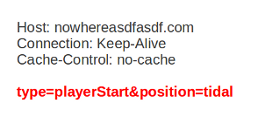
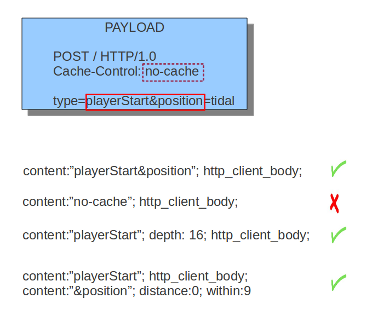
With the http_client_body content modifier, it is possible to
match specifically and only on the HTTP request body. The keyword can
be used in combination with all previously mentioned content modifiers
like distance, offset, nocase, within, etc.
Example of http_client_body in a HTTP request:
Example of the purpose of http_client_body:
Note: how much of the request/client body is inspected is controlled
in the libhtp configuration section via the request-body-limit
setting.
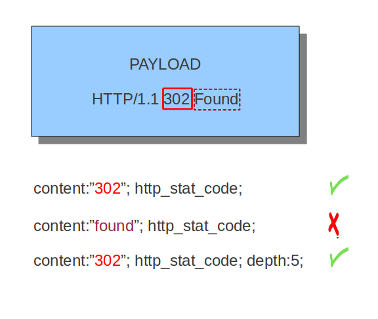
4.9.21. http_stat_code
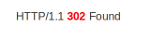
With the http_stat_code content modifier, it is possible to match
specifically and only on the HTTP status code buffer. The keyword can
be used in combination with all previously mentioned content modifiers
like distance, offset, nocase, within, etc.
Example of http_stat_code in a HTTP response:
Example of the purpose of http_stat_code:
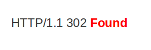
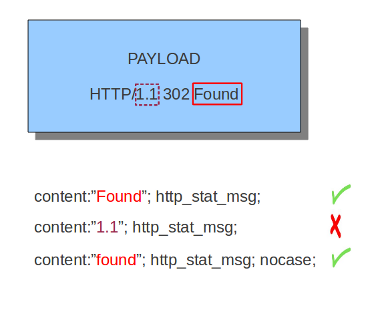
4.9.22. http_stat_msg
With the http_stat_msg content modifier, it is possible to match
specifically and only on the HTTP status message buffer. The keyword
can be used in combination with all previously mentioned content
modifiers like depth, distance, offset, nocase and
within.
Example of http_stat_msg in a HTTP response:
Example of the purpose of http_stat_msg:
4.9.23. http_response_line
The http_response_line forces the whole HTTP response line to be inspected.
Example:
alert http any any -> any any (http_response_line; content:"HTTP/1.0 200 OK"; sid:1;)
4.9.24. http_server_body
With the http_server_body content modifier, it is possible to
match specifically and only on the HTTP response body. The keyword can
be used in combination with all previously mentioned content modifiers
like distance, offset, nocase, within, etc.
Note: how much of the response/server body is inspected is controlled
in your libhtp configuration section via the response-body-limit
setting.
4.9.24.1. Notes
- Using
http_server_bodyis similar to having content matches that come afterfile_dataexcept that it doesn’t permanently (unless reset) set the detection pointer to the beginning of the server response body. i.e. it is not a sticky buffer. http_server_bodywill match on gzip decoded data just likefile_datadoes.- Since
http_server_bodymatches on a server response, it can’t be used with theto_serverorfrom_clientflow directives. - Corresponding PCRE modifier:
Q - further notes at the
file_datasection below.
4.9.25. http_host and http_raw_host
With the http_host content modifier, it is possible to
match specifically and only the normalized hostname.
The http_raw_host inspects the raw hostname.
The keyword can be used in combination with most of the content modifiers
like distance, offset, within, etc.
The nocase keyword is not allowed anymore. Keep in mind that you need
to specify a lowercase pattern.
4.9.25.1. Notes
The
http_hostandhttp_raw_hostbuffers are populated from either the URI (if the full URI is present in the request like in a proxy request) or the HTTP Host header. If both are present, the URI is used.The
http_hostandhttp_raw_hostbuffers will NOT include the header name, colon, or leading whitespace if populated from the Host header. i.e. they will not include “Host: “.The
http_hostandhttp_raw_hostbuffers do not include a CRLF (0x0D 0x0A) at the end. If you want to match the end of the buffer, use a relative ‘isdataat’ or a PCRE (although PCRE will be worse on performance).The
http_hostbuffer is normalized to be all lower case.The content match that
http_hostapplies to must be all lower case or have thenocaseflag set.http_raw_hostmatches the unnormalized buffer so matching will be case-sensitive (unlessnocaseis set).If a request contains multiple “Host” headers, the values will be concatenated in the
http_hostandhttp_raw_hostbuffers, in the order seen from top to bottom, with a comma and space (“, “) between each of them.Example request:
GET /test.html HTTP/1.1
Host: ABC.com
Accept: */*
Host: efg.net
http_hostbuffer contents:abc.com, efg.net
http_raw_hostbuffer contents:ABC.com, efg.net
Corresponding PCRE modifier (
http_host):WCorresponding PCRE modifier (
http_raw_host):Z
4.9.26. file_data
With file_data, the HTTP response body is inspected, just like
with http_server_body. The file_data keyword works a bit
differently from the normal content modifiers; when used in a rule,
all content matches following it in the rule are affected (modified)
by it.
Example:
alert http any any -> any any (file_data; content:"abc"; content:"xyz";)
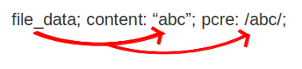
The file_data keyword affects all following content matches, until
the pkt_data keyword is encountered or it reaches the end of the
rule. This makes it a useful shortcut for applying many content
matches to the HTTP response body, eliminating the need to modify each
content match individually.
As the body of a HTTP response can be very large, it is inspected in smaller chunks.
How much of the response/server body is inspected is controlled
in your libhtp configuration section via the response-body-limit
setting.
If the HTTP body is a flash file compressed with ‘deflate’ or ‘lzma’,
it can be decompressed and file_data can match on the decompress data.
Flash decompression must be enabled under libhtp configuration:
# Decompress SWF files.
# 2 types: 'deflate', 'lzma', 'both' will decompress deflate and lzma
# compress-depth:
# Specifies the maximum amount of data to decompress,
# set 0 for unlimited.
# decompress-depth:
# Specifies the maximum amount of decompressed data to obtain,
# set 0 for unlimited.
swf-decompression:
  enabled: yes
  type: both
  compress-depth: 0
  decompress-depth: 0
4.9.26.1. Notes
- If a HTTP body is using gzip or deflate,
file_datawill match on the decompressed data. - Negated matching is affected by the chunked inspection. E.g.
‘content:!”<html”;’ could not match on the first chunk, but would
then possibly match on the 2nd. To avoid this, use a depth setting.
The depth setting takes the body size into account.
Assuming that the
response-body-minimal-inspect-sizeis bigger than 1k, ‘content:!”<html”; depth:1024;’ can only match if the pattern ‘<html’ is absent from the first inspected chunk. file_datacan also be used with SMTP