5.1. Rule Management with Suricata-Update
Note
suricata-update is in active development and is not yet
considered ‘production quality’. Proceed with care.
While it is possible to download and install rules manually, it is recommended to use a management tool for this. Suricata-Update is the official way to update and manage rules for Suricata.
To install suricata-update
sudo apt install python-pip python-yaml
sudo pip install --pre --upgrade suricata-update
To download the Emerging Threats Open ruleset, it is enough to simply run:
sudo suricata-update
This will download the ruleset into /var/lib/suricata/rules/
Suricata’s configuration will have to be updated to have a rules config like this:
default-rule-path: /var/lib/suricata/rules
rule-files:
  - suricata.rules
Now (re)start Suricata.
5.1.1. Updating your rules
To update the rules, simply run
sudo suricata-update
It is recommended to update your rules frequently.
5.1.2. Using other rulesets
Suricata-Update is capable of making other rulesets accessible as well.
To see what is available, fetch the master index from the OISF hosts:
sudo suricata-update update-sources
Then have a look at what is available:
sudo suricata-update list-sources
This will give a result similar to
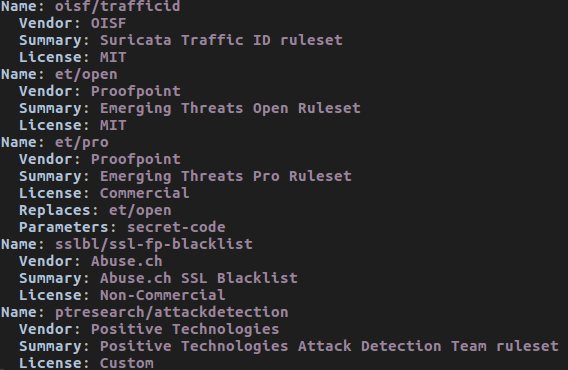
To enable ‘oisf/trafficid’, enter:
sudo suricata-update enable-source oisf/trafficid
sudo suricata-update
Now restart Suricata again and the rules from the OISF TrafficID ruleset are loaded.
To see which rulesets are currently active, use “list-enabled-sources”.
5.1.3. Controlling which rules are used
By default suricata-update will merge all rules into a single file “/var/lib/suricata/rules/suricata.rules”.
To enable rules that are disabled by default, use ‘/etc/suricata/enable.conf’
2019401                   # enable this sid
group:emerging-icmp.rules # enable this rulefile
re:trojan                 # enable all rules with this string
Similarly, to disable rules use /etc/suricata/disable.conf:
2019401                   # enable this sid
group:emerging-info.rules # disable this rulefile
re:heartbleed             # disable all rules with this string
After updating these files, rerun suricata-update again:
sudo suricata-update
Finally restart Suricata.